Posts

Showing posts with the label wso2

When you should consider using WSO2 ESB !!!

Over the time business operations and processes growing in a rapid rate which requires the organizations to focus more on the integration of different applications and reuse the services as much as possible for maintainability. The WSO2 ESB (Enterprise Service Bus) will seamlessly integrate applications, services, and processes across the platforms, if we simplify it, ESB is a collection of enterprise architecture design patterns that is catered through one single product. Lets see when you need to consider using WSO2 ESB for your business; 1. You have few applications/services working independently and now you need to integrate those 2. When you want to deal with multiple message types and media types 3. When you want to connect and consume services using multiple communication protocols (ex: jms, websockets , FIX) 4. When you want to implement Enterprise Integration scenarios such as route messages to suitable back-end or aggregate the responses coming form the back-end...
Working with WSO2 carbon Admin Services

Image
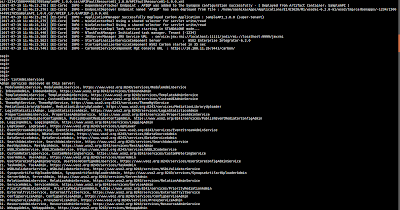
WSO2 products managed internally using defined SOAP web services named as admin services. This blog will describe how to call the admin services and perform operation with out using the Management Console. Note - I will be using WSO2 Enterprise Integrator to demonstrate this. Lets look at how to access the admin services in wso2 products. By default the admin services are hidden from the user. To enable the admin services, 1. Go to <EI_HOME>/conf/carbon.xml and enable admin services as follows <HideAdminServiceWSDLs>false</HideAdminServiceWSDLs> 2. Now start the EI server using ./integrator.sh -DosgiConsole When the server is started click 'Enter' and you will be directed to the osgi console mode. 3. To search the available admin services, Add 'listAdminServices' in the osgi console.This will list down the available admin services with the URL to access the admin services. Access Admin Service via SOAP UI 4. You can ac...

How to use nested UDTs with WSO2 DSS

WSO2 Data Services Server(DSS) is a platform for integrating data stores, creating composite data views and hosting data in different sources such as REST style web resources. This blog guides you through the process of extracting the data using a data services when nested User Defined Types (UDT) used in a function. Lets take the following oracle package that returns a nested UDT. When a nested UDT (A UDT that use standard data types and other UDT in it) exists in the oracle package, oracle package should be written in a way that it returns a single ref cursor, as DSS do not support nested UDTs out of the box. Lets take the following oracle package that includes a nested UDT called 'dType4'. In this example I have used Oracle DUAL Table to represent the results of multiple types included in the 'dType4'. Sample Oracle Package create or replace TYPE dType1 IS Object (City VARCHAR2(100 CHAR) ,Country VARCHAR2(2000 CHAR)); / create or replace TYPE dType2 IS T...

Use ZAP tool to intercept HTTP Traffic

Image
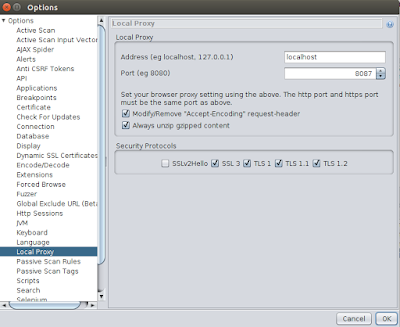
ZAP Tool Zed Attack Proxy is one of the most popular security tool that used to find security vulnerabilities in applications. This blog discuss how we can use the ZAP tool to intercept and modify the HTTP and HTTPS traffic. Intercepting the traffic using the ZAP tool Before we start, lets download and install the ZAP Tool. 1) Start the ZAP tool using / zap.sh 2) Configure local proxy settings  To configure the Local Proxy settings in the ZAP tool go to Tools -> Options -> Local Proxy and provide the port to listen. 3) Configure the browser  Now open your preferred browser and set up the proxy to listen to above configured port. For example: If you are using FireFox browser browser proxy can be configured by navigating to "Edit -> Preferences -> Advanced -> Setting -> Manual Proxy Configuration" and providing the same port configured in the ZAP proxy 4) Recording the scenario Open the website that you want to intercept usi...

Docker makes your life easy !!!

Most of the time we have come across situations to set up a cluster for WSO2 products. With in a product QA cycle it is a very common thing. But as you all know it consumes considerable amount of time to set up the cluster and troubleshoot. Now, with the use of dockers we can set up a cluster within few seconds and it makes your life easy :) So let me give a basic knowledge on what is "docker" What is Docker In most simplest terms, docker is a platform to containerize software images. Install Docker  : https://docs.docker.com/engine/installation/linux/ubuntulinux/ What is Docker Compose Docker compose is used to compose several applications and run those using one single command to initialize in multiple containers. Install Docker Compose : https://docs.docker.com/compose/install/ For some of the wso2 products there are docker compose images already exists in a private repository. Main purpose of this blog is to highlight some of the useful docker comm...

Encrypting sensitive information in configuration files

Encrypting information  I thought to start from basics before dig in to the target topic. So lets look at what is "encrypting". Encrypting information is converting information in to another format, which is hard to understood. As we all know encrypting information is really useful to secure sensitive data. In wso2 products, there is an inbuilt 'Secure Vault' implementation to encrypt plain text information in the configuration files to provide more security. In this post I will not discuss about the secure vault implementation in details. You can refer ' secure vault implementation ' to get more insight about it. In wso2 products based on carbon 4.4.0 or later visions, 'Ciper Tool' feature is installed by default, therefore you can easily use that to encrypt sensitive information in the configuration file.  Lets move on to the main purpose of this blog. We already know that we can use ciper tool encrypt the information in configuration ...

Information filtering using grep commands

While I was working on monitoring the long running test issues, I thought it would be useful to write a post on the usage of 'grep' commands in Linux. In this article I will be discussing few real examples of using "grep" commands and how to execute grep commands as a shell script. Search for a given string  This command is use to search for specific string in a given file. grep "<Search String>" <File Name> Ex: In the below example, it will search for the string "HazelcastException" within wso2carbon.log file. grep "HazelcastException" wso2carbon.log Search for a given string and write the results to a text file This command is use to search for a given string and write the search results to a text file. grep "<Search String>" <File Name> > <Text File Name> Ex: In the below example, it will search for the string "HazelcastException" within wso2carbon.log file and wri...

Allowing empty charachters using regular expression

Image
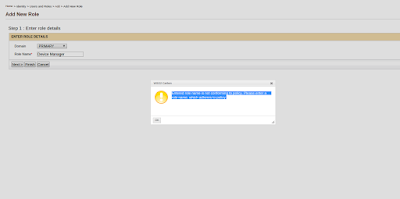
This post will guide you to configure regular expression, to allow empty characters (spaces) for properties like user name and role name. Validations for User Name, Role Name and Password are done using the regular expressions provided in <Product_Home>/repository/conf/user-mgt.xml file. I will be taking EMM product as the example. By default empty characters are not allowed for role names in management console. If you enter a role with empty character (ex: Device Manager) you will get a message as in below image.  Follow below steps to allow empty characters for role name. 1. Go to <EMM_HOME>/repository/conf/user-mgt.xml file and open the file. Then change <RolenameJavaRegEx> property and <RolenameJavaScriptRegEx> proerty as given below Property name="RolenameJavaRegEx">[a-zA-Z0-9\s._-|//]{3,30}$</Property> Property name="RolenameJavaScriptRegEx">^\w+( \w+)*$</Property> Note - <RolenameJ...

Setting up Apache Storm Topology for CEP distributed mode deployment

Image
This post will guide you through the storm part of the configuration for the wso2 Complex Event Processor(CEP) deployment in distributed mode. Please refer: https://docs.wso2.com/display/CLUSTER44x/Clustering+CEP+4.0.0 for the CEP part of the configuration.      Here I will be illustrating a basic storm setup, with three instances running as below diagram. Their details are as below Nimbus host - 192.168.22.231 Zookeeper host -192.168.22.235 Supervisor host - 192.168.22.232 Configuring Zookeeper I will be referring the location of zookeeper folder  as <Zookeeper_HOME>. 1. Download  zookeeper  from here 2. Extract the zookeeper.zip file to 192.168.22.235 instance 3. Go to <Zookeeper_HOME> directory and create a folder called 'data'. 4. Zookeeper needs a configuration file to start. You can create a file called zoo.conf inside <Zookeeper_HOME>/conf directory tickTime=2000 dataDir= <Zookeeper_HOME> /z...